
Get started with BulkRules
BulkRules adds wholesale order rules that Shopify checks at checkout: minimum and maximum quantities, pack sizes and order value limits, for everyone or only for some customers.
1. Install and open the app
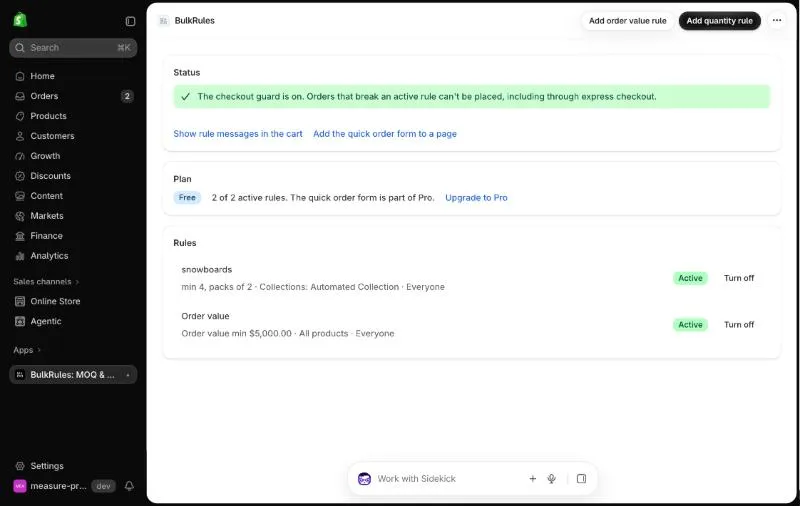
Section titled “1. Install and open the app”Install BulkRules from the Shopify App Store and open it from Apps → BulkRules. On first open, the app switches on its checkout check. The Status card confirms it’s on.
2. Create a rule
Section titled “2. Create a rule”Click Add quantity rule, then for example:
- Applies to: Collections → choose Snowboards
- Count quantities: All selected products together (mix and match)
- Minimum: 4, Pack size: 2
- Name in messages: snowboards
Click Save. See Quantity rules for every option.
3. Show rule messages in the cart
Section titled “3. Show rule messages in the cart”Click Show rule messages in the cart. The theme editor opens with the Wholesale rule messages app embed. Switch it on and click Save.
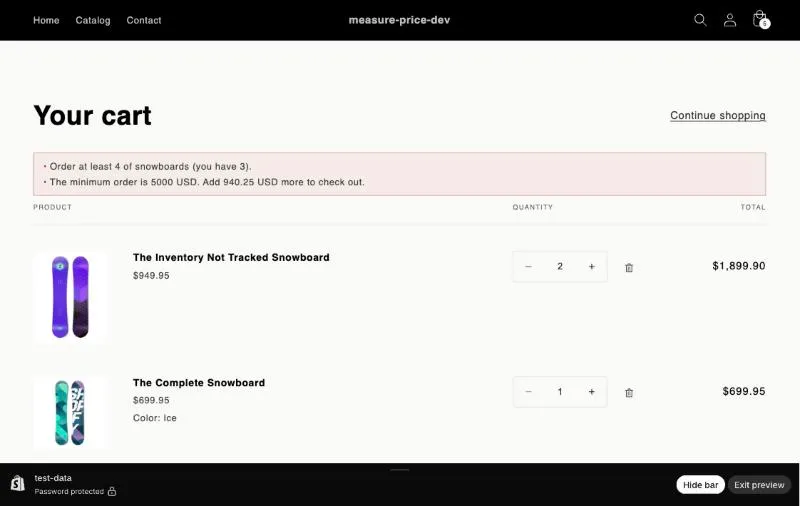
Buyers now see what’s missing in the cart and the cart drawer, before they reach checkout.
4. Try it
Section titled “4. Try it”Add 3 snowboards to the cart. The cart shows “Order at least 4 of snowboards (you have 3).” Go to checkout: the same message stops the order. Change the quantity to 4 and checkout continues.